It’s 3 PM on a Tuesday in July, and your AC just quit. The thermostat says 78, but your living room feels like 85. Your first thought? Call someone. Fast.
Look, I get it. When the AC dies during a Houston summer, panic mode kicks in. But here’s the thing—a lot of “breakdowns” aren’t actually broken. Our techs get calls every week where the fix takes about 30 seconds and doesn’t require a single tool. Yeah, you’ll want to know these tricks before you spend $150 on a service call.
Quick Facts: What Houston Homeowners Need to Know
- Peak season reality: Our phones light up during heat waves, but roughly 40% of those calls could’ve been solved by checking three basic things first.
- Hard water + humidity: Houston’s climate accelerates dust buildup in your system. That means filters get nasty faster here than in drier climates—plan on changing yours every 30–45 days, not the 90 days the package says.
- Circuit breaker trips: Summer storms knock out power, and when it comes back, HVAC breakers sometimes don’t reset themselves. Quick check before calling? Worth it.
- Outdoor unit blockage: We’ve pulled everything from shopping bags to wasp nests out of outdoor units. Memorial-area homes with heavy landscaping see this constantly.
- Thermostat confusion: Honestly, about half the “my AC isn’t working” calls we get are really just thermostat settings that got bumped or batteries that died.
- Ice = stop immediately: If you see frost anywhere on your system, turn it off. Running a frozen unit damages the compressor—and that’s a $2,000+ repair we’d rather you avoid.
Why Quick Checks Matter (Even for Quality Systems)
Whether you’ve got a Carrier from a neutral HVAC company in Katy or a Trane from an American Standard dealer in Tomball, every system has the same weak points. Blocked airflow. Wrong settings. Tripped breakers. These aren’t brand-specific problems—they’re physics.
And honestly? In our experience, waiting for a tech during peak season can take hours. Sometimes a full day. If your issue is a $4 air filter or a flipped breaker, you’re back to cool air in five minutes instead of five hours.
The thing is, HVAC systems are built to protect themselves. When something’s wrong, they shut down before serious damage happens. That’s good news, because it means a lot of “emergencies” are really just your system saying “hey, check on me.”
Six Things to Check Before You Call
Alright, let’s walk through this. Start at number one and work your way down. If nothing helps, you’ve at least ruled out the easy stuff before a tech shows up.
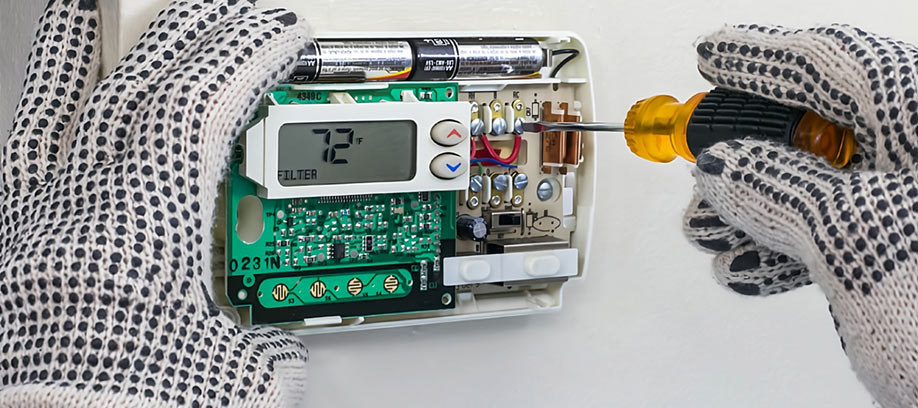
Check Your Thermostat Settings
I know, I know—this feels too obvious. But you’d be shocked. We’ve driven to Sugar Land for a service call where the thermostat was set to “heat” in July. (Someone’s kid was playing with it.)
Here’s what to verify:
- Mode is set to “Cool” (or “Heat” in winter—yeah, we get cold snaps)
- Fan setting is on “Auto,” not “On” (if it’s stuck on “On,” the fan runs constantly even when not cooling)
- Temperature setting is actually lower than the current room temp
- Batteries are fresh (if your thermostat uses them)
- The screen is lit up and responding
Pro tip: If you’ve got one of those fancy smart thermostats and it’s acting weird, try unplugging it for 30 seconds. Sometimes they just need a reset.
Inspect Your Air Filter
This is the number one thing. Seriously. A clogged filter chokes your system and causes about 80% of the airflow problems we see.
Signs your filter is the problem:
- Some rooms feel stuffy while others are fine
- The system runs constantly but never reaches temperature
- You’re getting warm air even though the AC is on
- There’s ice forming on the outdoor unit
Houston’s humidity and all that pollen? Your filter’s working overtime. If it looks gray or you can’t see light through it, replace it. They’re like $15 at Home Depot. We’ve seen thousand-dollar repair bills that could’ve been avoided with a $15 filter.
And look—if you’ve got pets or allergies, you’re gonna want to change that thing every month. No exceptions.
Check the Circuit Breakers
HVAC systems pull serious power. When storms roll through The Heights or Memorial, breakers trip. Sometimes they don’t flip back on their own when power returns.
Walk to your electrical panel. Look for breakers labeled “AC,” “Air Handler,” or “Furnace.” If one’s in the middle position (tripped), flip it all the way off, then back on.
If it trips again immediately? Stop. Don’t keep resetting it. That’s an electrical issue, and electrical issues are not DIY territory. Call us (or an electrician first, depending on the symptoms).
Inspect Your Vents and Returns
Blocked vents force your system to work way harder than it should. And in Houston heat, that extra strain adds up fast.
Do a walkthrough:
- Make sure all vents are open and unblocked by furniture
- Check return air grilles (the big vents that suck air in—usually on walls or ceilings)
- Vacuum off any visible dust on vent covers
You know that room that’s always warmer than the rest of the house? Check the vent. Nine times out of ten, it’s closed or blocked.
Clear Your Outdoor Unit
The outdoor unit (condenser) needs airflow just like your lungs need air. When it’s buried in leaves, grass clippings, or overgrown bushes, it can’t breathe.
What to look for:
- Debris on top or around the unit
- Grass clippings stuck to the sides
- Shrubs or plants within two feet of the unit
- Dirt buildup on the fins (the metal slats on the sides)
Grab a garden hose and gently rinse the outside. Don’t blast it with a pressure washer—you’ll bend the fins. And don’t open the unit. Just clean what you can see from the outside.
Look for Ice or Water
This one’s a red flag. If you see frost on the refrigerant lines, ice on the outdoor unit, or water pooling near the indoor unit, turn the system off. Switch the thermostat fan to “On” to help it thaw.
Ice usually means restricted airflow (bad filter) or low refrigerant (needs a tech). Either way, running it while frozen damages the compressor. We’ve replaced compressors that could’ve been saved if someone had just turned the system off when they saw ice.
When to Stop and Call a Pro
Some problems you just can’t fix yourself. And that’s fine—these systems are complex. Here’s when to pick up the phone.
Strange Smells
Burning or electrical smell? Shut it down and call immediately. That’s a fire risk.
Musty or moldy smell? Probably a drain issue or mold in the ducts. Not an emergency, but needs attention.
Chemical or sweet smell? Could be refrigerant. Also needs a pro.
Unusual Noises
Grinding, rattling, squealing, banging—none of these are normal. Loose parts, failing motors, or damaged components don’t fix themselves. The longer you wait, the more expensive the repair gets.
Skyrocketing Energy Bills
If your electric bill jumps 30% for no clear reason, something’s wrong. Could be a failing compressor, refrigerant leak, or a system that’s short-cycling (turning on and off constantly). All of these need a tech.
Hot and Cold Spots That Won’t Go Away
One room freezing, another room like a sauna? After you’ve checked vents and filters, this usually points to duct leaks, damper problems, or blower motor issues.
Weak or No Airflow
If airflow’s weak even after a fresh filter and clear vents, you’re likely dealing with a blower motor issue, bad capacitor, or evaporator coil problems. All internal. All need a licensed tech.
Houston HVAC Reality Check
Let’s be real—Houston’s hard on HVAC systems. We run our AC nine months a year. The humidity makes everything work harder. Summer heat waves push older systems past their limits.
We’re also seeing more smart thermostat installations in Katy, Sugar Land, and Pearland. They help, especially with energy costs, but they can be finicky. If yours is acting up, sometimes it’s a Wi-Fi issue, not an HVAC issue.
Heat pumps are getting popular, too—especially for new builds in The Woodlands and Cypress. They’re efficient and handle our mild winters well. But they’re a little different to troubleshoot, so if you’ve got one and something feels off, it’s worth a service call sooner rather than later.
And yeah, indoor air quality’s becoming a bigger deal. Wildfire smoke, pollen, mold—Houston air isn’t always the cleanest. We’re getting more requests for upgraded filtration and UV lights. If allergies are kicking your butt, that’s something to consider during your next maintenance visit.
FAQ
How long should I troubleshoot before calling HVAC repair?
Give it 15–20 minutes max. If basic checks don’t restore cooling or airflow, call. Don’t waste a whole afternoon when it’s 95 degrees outside.
Is it safe to clean my outdoor AC unit myself?
Yep—light rinsing with a garden hose and clearing debris is totally safe. Just don’t open the unit or spray electrical components.
Why is my HVAC blowing warm air?
Most common reasons: clogged filter, wrong thermostat setting, low refrigerant, or a frozen evaporator coil. Check the easy stuff first.
Can a dirty filter really cause the system to stop working?
Absolutely. A severely clogged filter can cause the unit to overheat, freeze up, or just shut down completely as a safety measure.
How often should I schedule HVAC maintenance in Texas?
Twice a year minimum—once before summer, once before winter. Houston systems work harder than systems in most climates, so skipping maintenance isn’t worth the risk.
Why Houston Homeowners Trust John Moore Services
For over 50 years, John Moore Services has been the go-to name for HVAC repairs across the greater Houston area. Whether you’re in The Heights, Katy, Sugar Land, or Pearland, our licensed technicians know Texas systems inside and out.
We get it—your comfort matters. When your AC quits in the middle of July or your heater won’t fire up during a freeze, you need someone reliable. That’s what we do. Same-day service when available, honest recommendations, and no surprises. If you’ve tried the steps above and your system still isn’t cooperating, give us a call. We’re here to help.